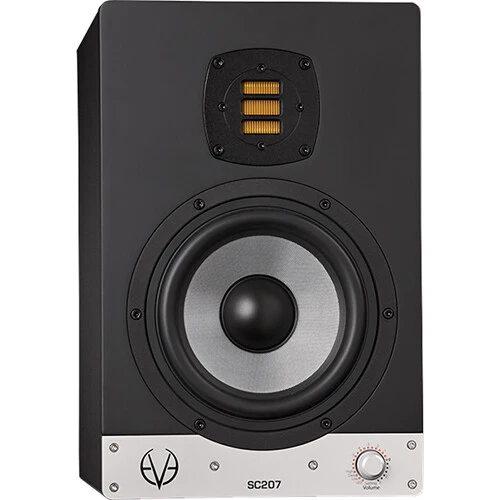
Eve Audio SC207 Active 2-Way 6.5" Nearfiled Studio Monitor (All-Black, Single)
Eve Audio SC207 Overview
Designed for home or professional studio applications, the EVE Audio SC207 is a two-way active nearfield studio monitor that's equipped with a bi-amplifier with a short-term total output of 150W for powering its 6.5" woofer and an AMT RS1 tweeter. The SC207 is designed to offer maximum headroom with minimal distortion.
The custom-made woofer, which is driven by a 1.5" voice coil, provides bass frequency response down to 44 Hz. The SC207 also features both balanced XLR inputs and unbalanced RCA inputs for flexible connectivity, and a selector knob on the front that gives access to volume control and filter settings to help you tailor your monitors to the way you work.
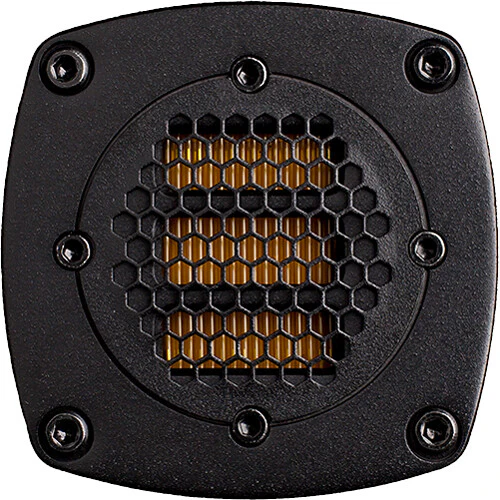
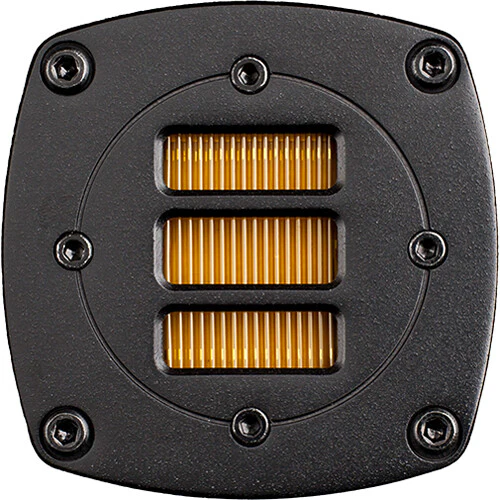
- A unique driver technology, distinct from other audio drivers. It utilizes a lightweight, hand-folded diaphragm that is thinly coated with aluminum. The current of the music signal flows through these conductive strands.
- The diaphragm is placed in a powerful magnetic field leading to movement in the folds caused by the Lorentz force. Due to the opposing direction of the current the walls of each single fold work against each other. The air between the folds is squeezed in and out at a ratio of 1:4, compared to the 1:1 ratio of a regular dome tweeter.
- This results in higher resolution and dynamics in the tweeter section, along with a very low distortion level, allowing superior sound quality with enhanced detail and clarity.
The 6.5" woofer is designed for an extended bass response. It features a very stiff diaphragm is honeycomb structured and glass fiber coated. It is driven by a sophisticated low-distortion copper cap magnet system that uses a 1.5" voice coil, resulting in a tight and dynamic bass, along with the usual greater linear excursion.
- All EVE Audio monitors feature a high-resolution DSP electronics. A high-quality analog/digital converter from BurrBrown (24-bit/192 kHz) converts the analog input signal supplied via RCA or XLR. The DSP provides latency-free filtering while protecting tweeter and woofer against overload across the entire frequency range. When switched on, the volume of the monitor increases slowly to leave enough time to reduce the source volume if the input signal is too loud.
- Adjustments to the acoustic environment can be made via the front rotary/pressure encoder, the SMART-knob with rotating LED ring. This knob allows the leveling of system volume as well as the adjustment of filters for room variables (low shelf, mid eq, and high shelf filters). All settings are displayed on the LED ring, providing instant information about the selected values. The brightness of the LED ring can be adjusted for dark studios or video applications.
- High-quality Class-D amplifiers complete the system and deliver enough power to the demands of modern music production. Selected volume and/or filter settings can be independently fixed with DIP-switches that are positioned on the rear of the amplifier to prevent unauthorised or unintentional adjustments.
- Press and hold the control three seconds in order to put the monitor in Standby mode. The volume will decrease gradually while the LED ring lights up once around the Volume control. Afterwards, the LED on the right end will remain dimly lit and the power consumption is reduced to 1 watt.
Volume
- The volume can be adjusted by turning the knob. Depending on the LED mode selected, the volume will be displayed as a dim/bright circle or as a dim/bright point.
Mute
- To put the monitor in Mute Mode, turn the volume control counterclockwise until you reach the minimum level. When the LED on the left end lights up dimly the Mute Mode is activated.
Settings
- Press the SMART-knob once to enter the Settings menu. Here you can set different filters as well as the LED ring?s behavior. The LED of the currently active function blinks.
- Distance from speakers: high frequencies weaken as you move further from the speakers. If you sit far from the speakers, boost the high frequencies. If you're close, like in a desktop setup (about 1 meter or 3 feet away), you might need to reduce the high frequencies.
- Room acoustics: in a room with few reflective surfaces ("dead room"), boosting high frequencies can create a more balanced sound. Conversely, in a room with many reflective surfaces, reducing the high frequencies is advisable.
- Adjust the high filter accordingly and achieve the best sound quality based on your listening position.
- Frequency balance: the midrange is crucial for balancing lower and higher mid frequencies. Use the Mid Filter to fine-tune the balance between the fundamental and harmonic frequencies in your music.
- Room acoustics: the acoustics of your room can affect how midrange frequencies are perceived. Sound energy from the monitors may reflect off surfaces like walls, floors, and ceilings, altering the sound.
- Adjust the Mid Filter to compensate for these reflections and achieve a balanced sound.
- The desk filter allows you to boost or cut you low-mid frequencies in 0.5 dB increments:
- Narrow-Band EQ: depending on the model the filter is centered between 160 and 200 Hz. When turned down, it reduces the low-mid boost often caused by reflections from mixers and similar surfaces. Decrease the filter gain to lessen this effect.
- EQ at 80 Hz: when turned up, it enhances the lower frequencies, giving more punch to the sound.
- Attenuating low frequencies: if your room's acoustics cause a boost in low frequencies (due to room modes or speakers being close to walls), you can reduce them with the Low-Shelf Filter.
- Boosting low frequencies: if the low frequencies are too weak, you can enhance them to achieve a balanced frequency response.
- Adjust the Low-Shelf Filter accordingly to address any issues in the low-frequency range caused by your room's acoustics.
- Bright Ring: all LEDs up to the selected volume level light up brightly. As the signal gets louder, he brightly lit ring extends.
- Bright Point: only the LED corresponding to the selected volume level lights up brightly. As the signal gets louder, the brightly lit point moves further up.
- Dim Ring: all LEDs up to the selected volume level light up dimly. As the signal gets louder, the dimly lit ring extends. The LEDs light up brightly momentarily when you adjust the volume.
- Dim Point: only the LED corresponding to the selected volume level lights up dimly. As the signal gets louder, the dimly lit point moves further up.
In all modes, the LEDs indicate volume levels, adjusting in four steps. Intermediate steps are shown by the brightness level between two adjacent LEDs.
Items Included
- Eve Audio SC207 Active 2-Way 6.5" Nearfiled Studio Monitor (All-Black, Single)
- Power Cord
-
Limited 2-Year Manufacturer Warranty
Registration Extension: 3-Year
Additional Resources
No additional resources available
Eve Audio SC207 Specs
| Tweeter |
1x 1" / 25.4 mm Air Motion Transformer
|
| Woofer |
1x 6.5" / 16.5 cm Cone
Voice Coil: 1.5" / |
| Frequency Range |
44 Hz to 21 kHz (-3 dB)
|
| Digital Audio I/O |
No
|
| Network I/O |
No
|
| Wireless |
No
|
| Tweeter |
1x 1" / 25.4 mm Air Motion Transformer
|
| Woofer |
1x 6.5" / 16.5 cm Cone
Voice Coil: 1.5" / |
| Frequency Range |
44 Hz to 21 kHz (-3 dB)
|
| Digital Audio I/O |
No
|
| Network I/O |
No
|
| USB |
No
|
| Wireless |
No
|
| Mobile App Compatible |
No
|
| AC Input Power |
100 to 240 VAC, 50/60 Hz
|
| Power Consumption |
1 W (Standby)
120 VA (Maximum) 200 W (Maximum) |
| Color |
Black
|
| Monitor Orientation |
Vertical
|
| Dimensions (W x H x D) |
8.5 x 13 x 11" / 215 x 330 x 280 mm
|
| Weight |
17.6 lb / 8.0 kg
|
All product and company names are trademarks™ or registered® trademarks of their respective holders. Use of them does not imply any affiliation with or endorsement by them.
Original: $1,525.40
-70%$1,525.40
$457.62More Images
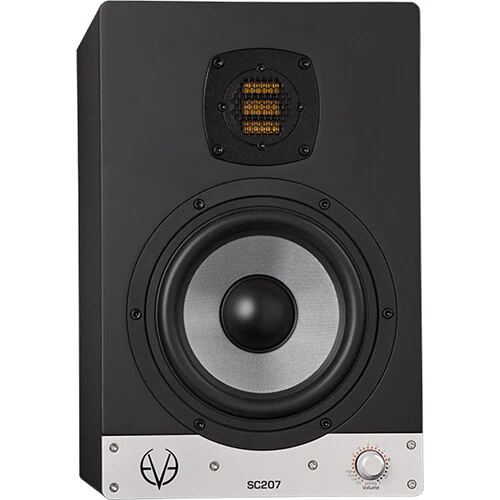
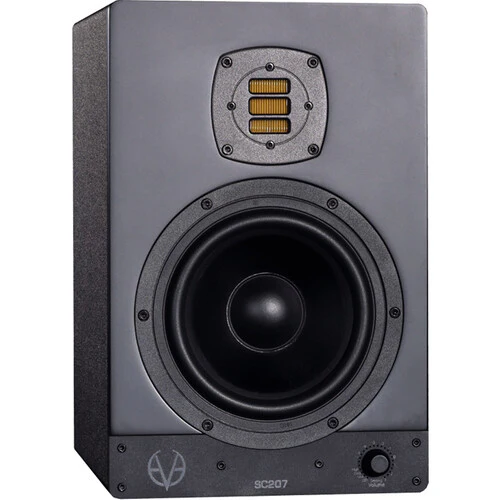
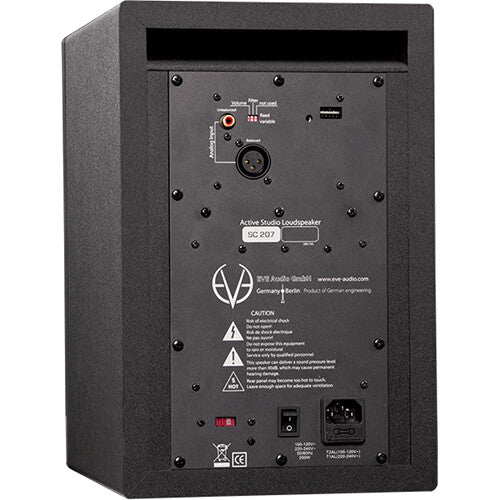
Eve Audio SC207 Active 2-Way 6.5" Nearfiled Studio Monitor (All-Black, Single)
Eve Audio SC207 Overview
Designed for home or professional studio applications, the EVE Audio SC207 is a two-way active nearfield studio monitor that's equipped with a bi-amplifier with a short-term total output of 150W for powering its 6.5" woofer and an AMT RS1 tweeter. The SC207 is designed to offer maximum headroom with minimal distortion.
The custom-made woofer, which is driven by a 1.5" voice coil, provides bass frequency response down to 44 Hz. The SC207 also features both balanced XLR inputs and unbalanced RCA inputs for flexible connectivity, and a selector knob on the front that gives access to volume control and filter settings to help you tailor your monitors to the way you work.
- A unique driver technology, distinct from other audio drivers. It utilizes a lightweight, hand-folded diaphragm that is thinly coated with aluminum. The current of the music signal flows through these conductive strands.
- The diaphragm is placed in a powerful magnetic field leading to movement in the folds caused by the Lorentz force. Due to the opposing direction of the current the walls of each single fold work against each other. The air between the folds is squeezed in and out at a ratio of 1:4, compared to the 1:1 ratio of a regular dome tweeter.
- This results in higher resolution and dynamics in the tweeter section, along with a very low distortion level, allowing superior sound quality with enhanced detail and clarity.
The 6.5" woofer is designed for an extended bass response. It features a very stiff diaphragm is honeycomb structured and glass fiber coated. It is driven by a sophisticated low-distortion copper cap magnet system that uses a 1.5" voice coil, resulting in a tight and dynamic bass, along with the usual greater linear excursion.
- All EVE Audio monitors feature a high-resolution DSP electronics. A high-quality analog/digital converter from BurrBrown (24-bit/192 kHz) converts the analog input signal supplied via RCA or XLR. The DSP provides latency-free filtering while protecting tweeter and woofer against overload across the entire frequency range. When switched on, the volume of the monitor increases slowly to leave enough time to reduce the source volume if the input signal is too loud.
- Adjustments to the acoustic environment can be made via the front rotary/pressure encoder, the SMART-knob with rotating LED ring. This knob allows the leveling of system volume as well as the adjustment of filters for room variables (low shelf, mid eq, and high shelf filters). All settings are displayed on the LED ring, providing instant information about the selected values. The brightness of the LED ring can be adjusted for dark studios or video applications.
- High-quality Class-D amplifiers complete the system and deliver enough power to the demands of modern music production. Selected volume and/or filter settings can be independently fixed with DIP-switches that are positioned on the rear of the amplifier to prevent unauthorised or unintentional adjustments.
- Press and hold the control three seconds in order to put the monitor in Standby mode. The volume will decrease gradually while the LED ring lights up once around the Volume control. Afterwards, the LED on the right end will remain dimly lit and the power consumption is reduced to 1 watt.
Volume
- The volume can be adjusted by turning the knob. Depending on the LED mode selected, the volume will be displayed as a dim/bright circle or as a dim/bright point.
Mute
- To put the monitor in Mute Mode, turn the volume control counterclockwise until you reach the minimum level. When the LED on the left end lights up dimly the Mute Mode is activated.
Settings
- Press the SMART-knob once to enter the Settings menu. Here you can set different filters as well as the LED ring?s behavior. The LED of the currently active function blinks.
- Distance from speakers: high frequencies weaken as you move further from the speakers. If you sit far from the speakers, boost the high frequencies. If you're close, like in a desktop setup (about 1 meter or 3 feet away), you might need to reduce the high frequencies.
- Room acoustics: in a room with few reflective surfaces ("dead room"), boosting high frequencies can create a more balanced sound. Conversely, in a room with many reflective surfaces, reducing the high frequencies is advisable.
- Adjust the high filter accordingly and achieve the best sound quality based on your listening position.
- Frequency balance: the midrange is crucial for balancing lower and higher mid frequencies. Use the Mid Filter to fine-tune the balance between the fundamental and harmonic frequencies in your music.
- Room acoustics: the acoustics of your room can affect how midrange frequencies are perceived. Sound energy from the monitors may reflect off surfaces like walls, floors, and ceilings, altering the sound.
- Adjust the Mid Filter to compensate for these reflections and achieve a balanced sound.
- The desk filter allows you to boost or cut you low-mid frequencies in 0.5 dB increments:
- Narrow-Band EQ: depending on the model the filter is centered between 160 and 200 Hz. When turned down, it reduces the low-mid boost often caused by reflections from mixers and similar surfaces. Decrease the filter gain to lessen this effect.
- EQ at 80 Hz: when turned up, it enhances the lower frequencies, giving more punch to the sound.
- Attenuating low frequencies: if your room's acoustics cause a boost in low frequencies (due to room modes or speakers being close to walls), you can reduce them with the Low-Shelf Filter.
- Boosting low frequencies: if the low frequencies are too weak, you can enhance them to achieve a balanced frequency response.
- Adjust the Low-Shelf Filter accordingly to address any issues in the low-frequency range caused by your room's acoustics.
- Bright Ring: all LEDs up to the selected volume level light up brightly. As the signal gets louder, he brightly lit ring extends.
- Bright Point: only the LED corresponding to the selected volume level lights up brightly. As the signal gets louder, the brightly lit point moves further up.
- Dim Ring: all LEDs up to the selected volume level light up dimly. As the signal gets louder, the dimly lit ring extends. The LEDs light up brightly momentarily when you adjust the volume.
- Dim Point: only the LED corresponding to the selected volume level lights up dimly. As the signal gets louder, the dimly lit point moves further up.
In all modes, the LEDs indicate volume levels, adjusting in four steps. Intermediate steps are shown by the brightness level between two adjacent LEDs.
Items Included
- Eve Audio SC207 Active 2-Way 6.5" Nearfiled Studio Monitor (All-Black, Single)
- Power Cord
-
Limited 2-Year Manufacturer Warranty
Registration Extension: 3-Year
Additional Resources
No additional resources available
Eve Audio SC207 Specs
| Tweeter |
1x 1" / 25.4 mm Air Motion Transformer
|
| Woofer |
1x 6.5" / 16.5 cm Cone
Voice Coil: 1.5" / |
| Frequency Range |
44 Hz to 21 kHz (-3 dB)
|
| Digital Audio I/O |
No
|
| Network I/O |
No
|
| Wireless |
No
|
| Tweeter |
1x 1" / 25.4 mm Air Motion Transformer
|
| Woofer |
1x 6.5" / 16.5 cm Cone
Voice Coil: 1.5" / |
| Frequency Range |
44 Hz to 21 kHz (-3 dB)
|
| Digital Audio I/O |
No
|
| Network I/O |
No
|
| USB |
No
|
| Wireless |
No
|
| Mobile App Compatible |
No
|
| AC Input Power |
100 to 240 VAC, 50/60 Hz
|
| Power Consumption |
1 W (Standby)
120 VA (Maximum) 200 W (Maximum) |
| Color |
Black
|
| Monitor Orientation |
Vertical
|
| Dimensions (W x H x D) |
8.5 x 13 x 11" / 215 x 330 x 280 mm
|
| Weight |
17.6 lb / 8.0 kg
|
All product and company names are trademarks™ or registered® trademarks of their respective holders. Use of them does not imply any affiliation with or endorsement by them.
Product Information
Product Information
Shipping & Returns
Shipping & Returns
Description
Eve Audio SC207 Overview
Designed for home or professional studio applications, the EVE Audio SC207 is a two-way active nearfield studio monitor that's equipped with a bi-amplifier with a short-term total output of 150W for powering its 6.5" woofer and an AMT RS1 tweeter. The SC207 is designed to offer maximum headroom with minimal distortion.
The custom-made woofer, which is driven by a 1.5" voice coil, provides bass frequency response down to 44 Hz. The SC207 also features both balanced XLR inputs and unbalanced RCA inputs for flexible connectivity, and a selector knob on the front that gives access to volume control and filter settings to help you tailor your monitors to the way you work.
- A unique driver technology, distinct from other audio drivers. It utilizes a lightweight, hand-folded diaphragm that is thinly coated with aluminum. The current of the music signal flows through these conductive strands.
- The diaphragm is placed in a powerful magnetic field leading to movement in the folds caused by the Lorentz force. Due to the opposing direction of the current the walls of each single fold work against each other. The air between the folds is squeezed in and out at a ratio of 1:4, compared to the 1:1 ratio of a regular dome tweeter.
- This results in higher resolution and dynamics in the tweeter section, along with a very low distortion level, allowing superior sound quality with enhanced detail and clarity.
The 6.5" woofer is designed for an extended bass response. It features a very stiff diaphragm is honeycomb structured and glass fiber coated. It is driven by a sophisticated low-distortion copper cap magnet system that uses a 1.5" voice coil, resulting in a tight and dynamic bass, along with the usual greater linear excursion.
- All EVE Audio monitors feature a high-resolution DSP electronics. A high-quality analog/digital converter from BurrBrown (24-bit/192 kHz) converts the analog input signal supplied via RCA or XLR. The DSP provides latency-free filtering while protecting tweeter and woofer against overload across the entire frequency range. When switched on, the volume of the monitor increases slowly to leave enough time to reduce the source volume if the input signal is too loud.
- Adjustments to the acoustic environment can be made via the front rotary/pressure encoder, the SMART-knob with rotating LED ring. This knob allows the leveling of system volume as well as the adjustment of filters for room variables (low shelf, mid eq, and high shelf filters). All settings are displayed on the LED ring, providing instant information about the selected values. The brightness of the LED ring can be adjusted for dark studios or video applications.
- High-quality Class-D amplifiers complete the system and deliver enough power to the demands of modern music production. Selected volume and/or filter settings can be independently fixed with DIP-switches that are positioned on the rear of the amplifier to prevent unauthorised or unintentional adjustments.
- Press and hold the control three seconds in order to put the monitor in Standby mode. The volume will decrease gradually while the LED ring lights up once around the Volume control. Afterwards, the LED on the right end will remain dimly lit and the power consumption is reduced to 1 watt.
Volume
- The volume can be adjusted by turning the knob. Depending on the LED mode selected, the volume will be displayed as a dim/bright circle or as a dim/bright point.
Mute
- To put the monitor in Mute Mode, turn the volume control counterclockwise until you reach the minimum level. When the LED on the left end lights up dimly the Mute Mode is activated.
Settings
- Press the SMART-knob once to enter the Settings menu. Here you can set different filters as well as the LED ring?s behavior. The LED of the currently active function blinks.
- Distance from speakers: high frequencies weaken as you move further from the speakers. If you sit far from the speakers, boost the high frequencies. If you're close, like in a desktop setup (about 1 meter or 3 feet away), you might need to reduce the high frequencies.
- Room acoustics: in a room with few reflective surfaces ("dead room"), boosting high frequencies can create a more balanced sound. Conversely, in a room with many reflective surfaces, reducing the high frequencies is advisable.
- Adjust the high filter accordingly and achieve the best sound quality based on your listening position.
- Frequency balance: the midrange is crucial for balancing lower and higher mid frequencies. Use the Mid Filter to fine-tune the balance between the fundamental and harmonic frequencies in your music.
- Room acoustics: the acoustics of your room can affect how midrange frequencies are perceived. Sound energy from the monitors may reflect off surfaces like walls, floors, and ceilings, altering the sound.
- Adjust the Mid Filter to compensate for these reflections and achieve a balanced sound.
- The desk filter allows you to boost or cut you low-mid frequencies in 0.5 dB increments:
- Narrow-Band EQ: depending on the model the filter is centered between 160 and 200 Hz. When turned down, it reduces the low-mid boost often caused by reflections from mixers and similar surfaces. Decrease the filter gain to lessen this effect.
- EQ at 80 Hz: when turned up, it enhances the lower frequencies, giving more punch to the sound.
- Attenuating low frequencies: if your room's acoustics cause a boost in low frequencies (due to room modes or speakers being close to walls), you can reduce them with the Low-Shelf Filter.
- Boosting low frequencies: if the low frequencies are too weak, you can enhance them to achieve a balanced frequency response.
- Adjust the Low-Shelf Filter accordingly to address any issues in the low-frequency range caused by your room's acoustics.
- Bright Ring: all LEDs up to the selected volume level light up brightly. As the signal gets louder, he brightly lit ring extends.
- Bright Point: only the LED corresponding to the selected volume level lights up brightly. As the signal gets louder, the brightly lit point moves further up.
- Dim Ring: all LEDs up to the selected volume level light up dimly. As the signal gets louder, the dimly lit ring extends. The LEDs light up brightly momentarily when you adjust the volume.
- Dim Point: only the LED corresponding to the selected volume level lights up dimly. As the signal gets louder, the dimly lit point moves further up.
In all modes, the LEDs indicate volume levels, adjusting in four steps. Intermediate steps are shown by the brightness level between two adjacent LEDs.
Items Included
- Eve Audio SC207 Active 2-Way 6.5" Nearfiled Studio Monitor (All-Black, Single)
- Power Cord
-
Limited 2-Year Manufacturer Warranty
Registration Extension: 3-Year
Additional Resources
No additional resources available
Eve Audio SC207 Specs
| Tweeter |
1x 1" / 25.4 mm Air Motion Transformer
|
| Woofer |
1x 6.5" / 16.5 cm Cone
Voice Coil: 1.5" / |
| Frequency Range |
44 Hz to 21 kHz (-3 dB)
|
| Digital Audio I/O |
No
|
| Network I/O |
No
|
| Wireless |
No
|
| Tweeter |
1x 1" / 25.4 mm Air Motion Transformer
|
| Woofer |
1x 6.5" / 16.5 cm Cone
Voice Coil: 1.5" / |
| Frequency Range |
44 Hz to 21 kHz (-3 dB)
|
| Digital Audio I/O |
No
|
| Network I/O |
No
|
| USB |
No
|
| Wireless |
No
|
| Mobile App Compatible |
No
|
| AC Input Power |
100 to 240 VAC, 50/60 Hz
|
| Power Consumption |
1 W (Standby)
120 VA (Maximum) 200 W (Maximum) |
| Color |
Black
|
| Monitor Orientation |
Vertical
|
| Dimensions (W x H x D) |
8.5 x 13 x 11" / 215 x 330 x 280 mm
|
| Weight |
17.6 lb / 8.0 kg
|
All product and company names are trademarks™ or registered® trademarks of their respective holders. Use of them does not imply any affiliation with or endorsement by them.